Subscription Price Increase Calculator: See the Extra Cost Per Year
Free price-change check
A small increase.
A full-year consequence.
Turn a subscription price-rise notice into a clear annual difference before the next renewal.

To calculate a subscription price increase, subtract the old charge from the new charge, then multiply by the number of charges per year. Divide that difference by the old price to find the percentage increase. This free calculator does both and shows the extra cost across a number of upcoming charges you choose.
Subscription price increase calculator
Use the same currency and billing interval for both prices. Enter the amount actually charged, including tax if you want tax included.
Amounts use your entered currency. Weekly estimates use 52 weeks; an exact calendar year can contain a different number of charge dates. The calculator does not infer renewal dates, exchange rates, proration, credits or cancellation rules. Its code does not send or save your entries; this page is hosted by Blogger.
Worked example: 9.99 becomes 12.99
| Question | Answer |
|---|---|
| Extra on each monthly charge | 3.00 |
| Old / new annualized total | 119.88 / 155.88 |
| Extra across 12 monthly charges | 36.00 |
| Percentage increase | 30.03% |
| Extra across the next three charges | 9.00 |
This is an illustrative calculation, not a quote from a provider. A price rise beginning partway through a year will not add a full twelve months of extra charges during that calendar year.
Turn the number into a decision
- Read the effective date. Distinguish the date of the notice from the first charge at the new price.
- Check the billing channel. Find whether the provider, Apple or another service manages the subscription.
- Compare like with like. Use the same plan, currency, tax treatment and billing interval. If the plan itself changes, note what is gained or lost separately.
- Record one next action. Keep, review the plan, or check the official cancellation process. Save a reminder before the provider's actual deadline.
- Check the result. If you cancel or downgrade, keep the confirmation and verify the next charge. A calculated difference is not money saved until the change actually happens.
What if the price goes down?
The result becomes negative and represents a lower estimated cost. The same arithmetic works; there is no need to swap the prices.
What if a free plan becomes paid?
The extra cost is calculable, but a percentage increase from zero is not. The calculator says “not defined” instead of inventing a percentage.
Can I compare monthly and annual plans here?
First put both prices on the same billing basis. This tool measures a price change on the same interval; cancellation terms, minimum commitments and unused months need a separate comparison.
Keep the decision beside the renewal
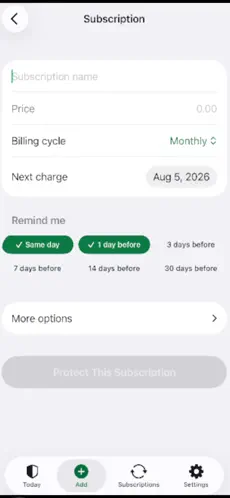
MoneyShield: Sub Tracker helps record subscriptions, scheduled price changes and reminders. Enter information yourself; it does not cancel services or connect to your bank.
Track the next renewal in MoneyShield
iPhone/iPad, iOS/iPadOS 18+. Free download with optional Plus purchases. Current listing offers seven days of Full Protection without payment, then a free plan. Check the App Store for current access.
Published by Honest Little Apps, the publisher of MoneyShield. Screenshots are from the app's current App Store listing, checked November 15, 2026. Contact: simpletonfacts@gmail.com.

Comments
Post a Comment