Subscription Cost Calculator: What Your Subscriptions Cost per Month, Year and 5 Years
Short answer: to see what a subscription really costs, convert everything to the same period. Weekly × 52 ÷ 12 gives a monthly figure; monthly × 12 gives a yearly one. Enter yours below to see the monthly, yearly and five-year totals.
Subscription cost calculator
Calculations run in your browser; this tool does not save or send your entries. Use one currency throughout. Leave unused rows blank.
| Subscription | Price ($) | Per |
|---|---|---|
FROM THE TOTAL TO THE NEXT DECISION
See the cost.
Keep the deadline in sight.
Choose one subscription to review. Check its next charge and official cancellation route. MoneyShield gives your manually entered subscriptions and reminders a home on your iPhone.

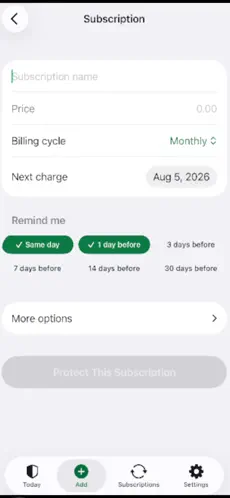

Actual App Store screenshots. Example amounts are illustrative.
Explore MoneyShield on the App StoreFree download with optional Plus purchases. Seven days of full features require no payment; the free plan follows automatically. This calculator does not transfer your entries into the app. MoneyShield does not cancel subscriptions for you or guarantee savings. Published by Honest Little Apps.
How to convert any subscription price
- Weekly to yearly: × 52. A $4.99/week app is $259.48 a year.
- Every four weeks to yearly: × 13, not × 12. $10 every four weeks is $130 a year; $10 monthly is $120.
- Monthly to yearly: × 12. A $15.99/month service is $191.88 a year.
- Yearly to monthly: ÷ 12. A $39.99/year app is about $3.33 a month.
- Weekly to monthly: × 52 ÷ 12 (not × 4). $4.99/week is about $21.62 a month.
Monthly vs yearly: when switching saves money
Many services discount the yearly plan. Compare the yearly price with 12 × the monthly price: if a service is $9.99/month or $79.99/year, the yearly plan saves $39.89, about 33%. Only switch for services you're sure you'll keep for the whole year, and set a reminder before the renewal date.
Worked example
A household with streaming at $15.99/month, music at $10.99/month, cloud storage at $2.99/month, a fitness app at $4.99/week and a photo editor at $39.99/year pays:
- Streaming $191.88 + music $131.88 + storage $35.88 + fitness $259.48 + editor $39.99
- = $659.11 a year, about $54.93 a month, and $3,295.55 over five years.
The weekly fitness app costs more than the streaming service, which is exactly the kind of charge that hides in a list of monthly bills.
What to do with the total
- Sort by yearly cost, biggest first. Review value and cancellation terms before changing anything.
- For each, ask: did I use it in the last 30 days?
- Cancel through the official route: iPhone subscriptions are managed in Settings → your name → Subscriptions; others through the provider's own account page.
- Note every free trial's end date before it converts. The full audit method is in how to find and cancel forgotten subscriptions.
Keep the list and the deadlines on your phone
MoneyShield: Sub Tracker is an iPhone app for deciding which subscriptions to keep and when to act before the next charge. It ranks what to cancel first (with a reason for each), estimates your monthly and yearly spend, shows a 30-day charge timeline, and reminds you before renewals, trial ends and cancel-by dates. Its Cancellation Assistant points you to the official cancel route with a checklist and request templates.
To be clear about limits: MoneyShield doesn't cancel subscriptions for you, doesn't connect to your bank or scan your email, and doesn't promise refunds. You add your subscriptions yourself, and the data stays on your iPhone with no account.
Pricing: free to download, with 7 days of full features to start and then a free plan. MoneyShield Plus (U.S. prices: $3.99/month, $24.99/year or $59.99 lifetime; regional pricing varies) adds unlimited subscriptions and deadlines, alerts up to 30 days ahead, the full Cancel First ranking and export.
Get MoneyShield on the App Store →
FAQ
How much does the average person spend on subscriptions? Estimates vary widely by survey and country, so your own total is the useful number. Add yours up with the calculator.
Is it cheaper to pay for subscriptions yearly? Often, when the provider discounts the annual plan, but only if you'd keep the service all year anyway.
How do I see all my subscriptions on iPhone? Open Settings, tap your name, then Subscriptions. That shows subscriptions billed through Apple; others appear on card or bank statements.
More ways to cut subscription costs
- How to save on streaming: the subscription rotation method
- How to cancel subscriptions on iPhone (and find forgotten ones)
- Free trial checklist: never get charged by surprise
When the price goes up
- A subscription raised its price: 5 options
- How to cancel a gym membership
- Find out what subscriptions you're paying for
Disclosure: this blog is published by the team behind MoneyShield. General information, not financial advice.
Free resources
Copy-ready: Subscription Cancellation Email Template (Copy and Paste). Compare options: Best iPhone Apps to Track Subscriptions and Free Trials (2026). Quick facts: What MoneyShield does, price and privacy.

Comments
Post a Comment