How to Find and Cancel Forgotten Subscriptions: A 20-Minute Audit
Most people underestimate what they spend on subscriptions, because the charges are small, monthly and spread across different places. Use this 20-minute audit to look for forgotten charges and decide what to review first.
Step 1: Find every subscription (10 minutes)
- iPhone: Settings → tap your name → Subscriptions. This lists everything billed through Apple, active and expired.
- Bank and card statements: review up to 12 months where available, including annual and quarterly charges; a three-month view can miss yearly renewals.
- Email: search your inbox for "receipt", "renewal", "your trial" and "subscription".
- PayPal or other wallets: check automatic payments.
Step 2: Write the yearly number next to each one
Monthly price × 12. A $9.99 app is $119.88 a year. Seeing the annual number changes decisions.
| Example | Monthly | Per year | Last used |
|---|---|---|---|
| Streaming service A | $15.49 | $185.88 | This week |
| Streaming service B | $9.99 | $119.88 | 2 months ago |
| Photo editing app | $7.99 | $95.88 | Once, in spring |
| Fitness app | $12.99 | $155.88 | Never after week 2 |
| Total | $557.52 | ||
Illustrative numbers, not real prices.
Step 3: Rank what to cancel first
- Free trials ending soon that you haven't decided on
- Anything you haven't used in 30+ days
- Duplicates (two streaming services you rotate between)
- Annual renewals coming up in the next 60 days
- Anything whose price went up recently
Step 4: Cancel properly
Follow the billing provider's cancellation deadline and leave time to complete the process. For Apple subscriptions, use the Subscriptions screen above; deleting the app does not cancel it. Screenshot the confirmation.
Step 5: Calendar the survivors
Add a reminder three days before each annual renewal so you decide on purpose next year.
Found a subscription to keep?
Remember its next charge.
Put the billing date and reminder in one place before closing your audit.
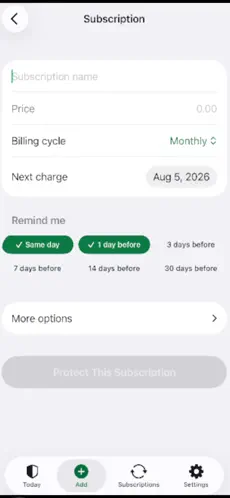
MoneyShield tracks subscriptions and renewal reminders without connecting your bank or scanning your email.
Get MoneyShield on the App Store →
Free download; optional in-app purchases. Some features require Plus. iOS 18+. Real App Store screenshot with example data.
Want this on your phone?
MoneyShield: Sub Tracker is an iPhone app that gives you one private place to see what you pay for, what it costs a year and what's charging you next. Its Cancel First list ranks subscriptions worth cancelling with the reason for each (usage, cost, renewal timing, price increases, trials ending), and you can Keep, Review Later or start cancelling in a tap. MoneyShield doesn't cancel anything for you; it helps you decide and reminds you in time.
Pricing: it starts with 7 days of Full Protection with no payment required; afterwards you move to the free plan automatically. Plus is $3.99/month, $24.99/year or $59.99 lifetime (US prices; may vary by region).
Get MoneyShield on the App Store →
Keep going
- How to find out what subscriptions you are paying for (6 places)
- How to share subscriptions with Family Sharing on iPhone
- Annual vs monthly subscription: which is cheaper?
More free guides:
- Subscription audit checklist: review every subscription in 20 minutes
- How much should you spend on subscriptions?
Disclosure: this blog is published by the team behind MoneyShield. Not financial advice.
Free resources
Copy-ready: Subscription Cancellation Email Template (Copy and Paste). Compare options: Best iPhone Apps to Track Subscriptions and Free Trials (2026). Quick facts: What MoneyShield does, price and privacy.

Comments
Post a Comment